
Scripts with user settings
A script with settings puts configurable fields right in QuickAdd’s UI, so anyone can set it up - an API key, a folder path, an on/off toggle - without editing the JavaScript. You write the script once and expose the parts that should change; everyone else fills in a form.
Any script with settings gets a gear (⚙️) button next to its name in a macro. Click it to open that script’s settings menu. For a real-world example, see the Movies macro.
Add settings to a script
Section titled “Add settings to a script”Instead of exporting a plain function, export an object with two properties:
entry (the function that runs) and settings (what to show in the UI).
const TEXT_FIELD = "Text field";
module.exports = {    entry: async (QuickAdd, settings) => {        // Logic here        const textFieldSettingValue = settings[TEXT_FIELD];    },    settings: {        name: "Demo",        author: "Christian B. B. Houmann",        options: {            [TEXT_FIELD]: {                type: "text",                defaultValue: "",                placeholder: "Placeholder",                description: "Description here.",            },            "API Key": {                type: "secret",                id: "api-key",                placeholder: "Paste API key",                description: "Stored securely with Obsidian SecretStorage.",            },            "Checkbox": {                type: "checkbox",                defaultValue: false,            },            "Dropdown": {                type: "dropdown",                defaultValue: "Option 1",                options: [                    "Option 1",                    "Option 2",                    "Option 3",                ],            },            "Format": {                type: "format",                defaultValue: "{{DATE:YYYY-MM-DD}}",                placeholder: "Placeholder",            },        }    },};
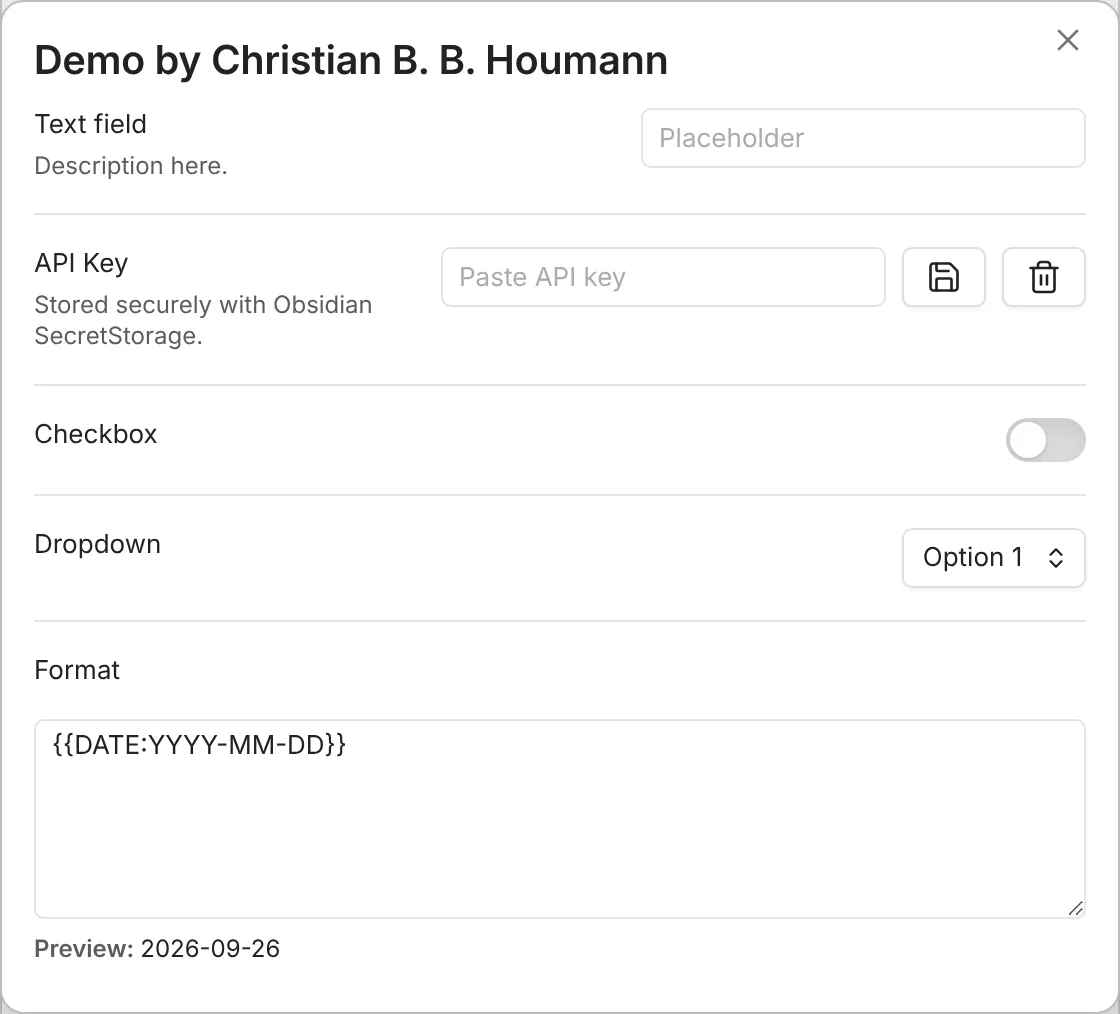
This script’s settings menu shows a text field, a secret API-key field, a
checkbox, a dropdown, and a format field - one per entry in options:
How the pieces fit together:
entryruns when the script executes. It receives two arguments: theQuickAddobject (the same thing passed to any script in a macro) andsettings, an object holding the values the user set. The argument names are up to you.settings.nameandsettings.authorare shown in the settings menu.settings.optionsdefines the fields. Each key is the setting’s name (and how you read its value back, likesettings["Text field"]); each value is an object describing the field. Add adescriptionto any field to show help text beneath it.
Scripts with several exports
Section titled “Scripts with several exports”A script can export more functions next to entry and settings. A macro
command named with ::, such as my-script::otherExport, runs that export
instead of entry. The export still receives settings as its second
argument, and the gear still shows the script’s settings. QuickAdd looks for
settings on the selected export first, then on each parent up to
module.exports, and uses the nearest one it finds - so an export without its
own settings uses the script’s.
Settings are saved per macro command, so two commands for the same script keep
separate values.
The field types
Section titled “The field types”Set each field’s type to one of these:
textandinput: A text field.secret: A password-style input stored with Obsidian SecretStorage. QuickAdd stores only a reference indata.json; package exports omit secret values and local secret references. Add an optionalidto give the stored secret a stable key if the visible setting label changes later. The oldertext/inputplussecret: trueform is still treated as a secret setting.textarea: A multi-line text area.checkboxandtoggle: A checkbox.dropdownandselect: A dropdown.format: A format field, adhering to format syntax.